|
<< Click to Display Table of Contents > 3D Surfaces |
  
|
|
<< Click to Display Table of Contents > 3D Surfaces |
|
With the Optic3D module enabled, the 3D Surface Toolbar can be activated via Settings → System → View → Toolbars. The toolbar consists of a surface selection drop-down menu, a Settings button (cogwheel) and the checkbox used to enable or disable the 3D surfaces.
The drop-down menu allows the selection of a 3D surfaces onto which marking data will be mapped. The settings button opens the configuration dialog for the currently selected surface. Detailed descriptions of the available settings can be found in the corresponding sub-chapters for each 3D surface type.
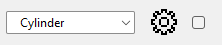
Figure 505: 3D Surfaces Toolbar
When the toolbar checkbox is enabled, the selected 3D surface is displayed in the View2D.
Available 3D Surfaces
The following surface types are available in Optic3D:
Cylinder: Maps data onto a cylindrical surface.
STL Projection: Maps data onto a surface defined by a STL model.
Tilted Surface: Maps data onto planar surface with defined inclination.
Sphere: Maps data onto a spherical surface.
Ring: Maps data onto a toroidal (ring-shaped) surface.
Cone: Maps data onto a conical surface (vertical or horizontal).