|
<< Click to Display Table of Contents > Ring |
  
|
|
<< Click to Display Table of Contents > Ring |
|
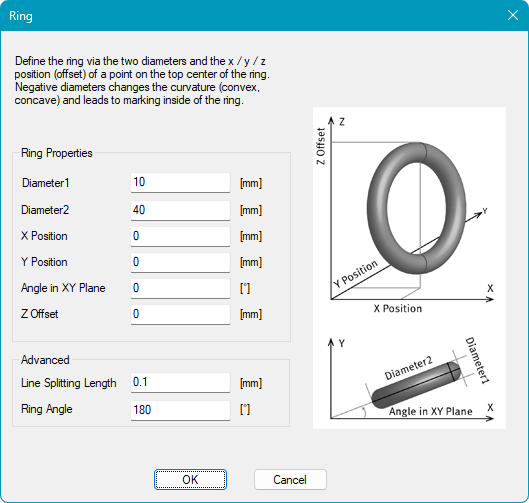
This sub chapter describes the available settings for the wrapping an object onto toroidal (ring-shaped) surface.
The surface configuration can be accessed by selecting Ring from the 3D Surface drop-down menu and clicking the Settings button.
|
Ring Properties: Defines the geometry and position of the ring. Diameter1: Defines the inner diameter of the ring. Diameter2: Defines the outer diameter of the ring. X Position: Defines the central X position of the ring. Y Position: Defines the central Y position of the ring. Angle in XY plane: Defines the rotation in the XY plane. Z Offset: Defines the Z position of the top of the ring. Advanced: Contains additional settings for toroidal marking. Line Splitting Length: Defines the distance along a line after which an additional point is generated and transformed onto the 3D surface. Each line is processed independently. Ring Angle: Defines the angular extent of the ring section. The specified angle is applied to both Diameter1 and Diameter2, determining the visible portion of the ring surface. The default value of 180° results in a quarter of the ring being visible, while smaller values show a smaller portion of the ring. This parameter affects the spacing of the blue dashed guidelines in the View2D. The Ring Angle can be set between 0.0001° and 180°. |
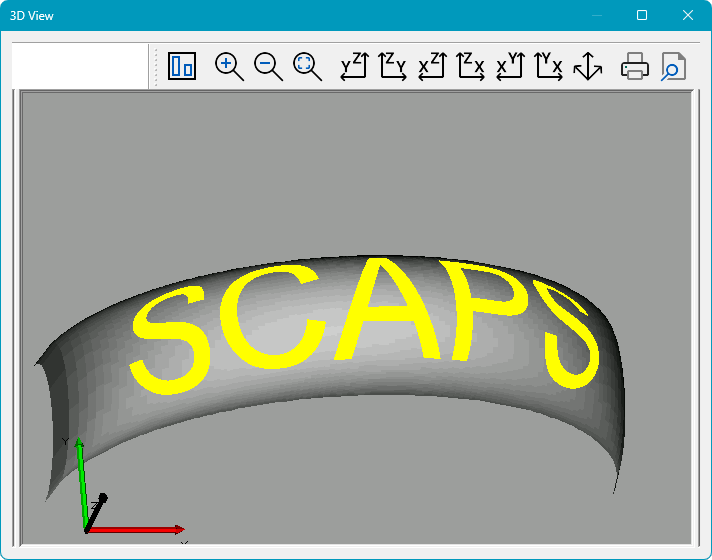
Please see below an example of a wrapped text entity in the View2D (left) and 3D View (right). Please note that the 3D View can be activated by clicking on the icon  in the toolbar.
In the View2D, the outer dashed rectangle represent the endpoints of the circular arc defined by the configured Ring Angle. Only vectors between these lines are projected onto the ring. The inner dashed rectangle represent the endpoints of the chord corresponding to the Ring Angle. In a cross-sectional view of the cylinder, the chord is a straight line connecting the arc endpoints.
The entities displayed in the View2D are shown in their unwrapped state and are not yet mapped onto the spherical surface.
|
Figure 520: 3D View of Ring |
|
For optimal marking quality, keep the marking area centered beneath the laser. Moving it too far away from the center reduces the laser incidence angle and may result in lower marking quality. |
|---|
|
Please note that points and point clouds are not visible in the 3D preview. |
|---|