|
<< Click to Display Table of Contents > Toolbars |
  
|
|
<< Click to Display Table of Contents > Toolbars |
|
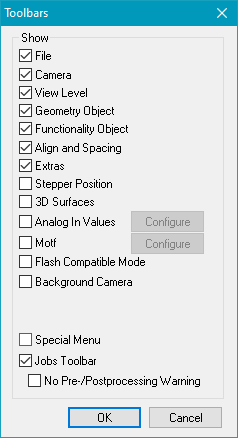
Figure 169: Select Toolbars Dialog |
The following toolbars can be activated/deactivated in Menu bar → System → Settings → View: |
|---|---|
Figure 170: Right-Click Toolbars Pop-up Menu |
Additionally, the toolbars can be activated/deactivated by right clicking in the region of the toolbars (see Figure 171). Lock: By clicking on this option, the current position of all activated toolbars will be locked. |