|
<< Click to Display Table of Contents > 1D Mark on the Fly Splitting |
  
|
|
<< Click to Display Table of Contents > 1D Mark on the Fly Splitting |
|
1D Mark on the Fly Splitting is similar to the preceding splitting modes, except that the motion is not controlled by a connected motion controller. Instead, the object is moved continuously by an external drive, as is common for "on the fly" applications in general. This field is only available for USC cards, and is only editable if Marking on the Fly is enabled in the settings.

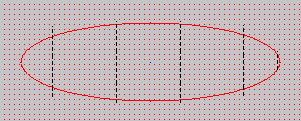
Figure 421: 1D MOTF Splitting
|
This feature is supported by every USC card and by RTC5/6, but not by RTC3/4 cards. |
|---|
|
A SAMLight software license with Mark on the Fly is required. If this splitting mode is active, marking via Start → Mark is disabled. This is because starting a mark via the Mark Dialog would introduce a delay about 200 ms, which would affect the MOTF marking result, as marking would start too late. However, the red pointer can be activated to show where the MOTF marking will occur. Marking can only be started via Mark → Trigger. The Split Preview can be used to create a 1D MOTF job with splitting that can be marked via Flash. If an option is grayed out in the Splitting Settings dialog, it cannot be used with the currently selected splitting option. Parameter that are checked but grayed out are not used. The external trigger signal can remain high during the entire marking process. Before version 4.1.5, the signal had to go low again after a rising edge before the next split part could start. Since version 4.1.5, SAMLight ignores further trigger signals while marking is already in progress. All motion control objects must be defined as non-splittable entities. See chapter Entity List. |
|---|
The following table lists all available parameters for 1D MOTF Splitting and their availability per marking mode:
1D MOTF Splitting Parameters |
Vector Marking |
|
|
|---|---|---|---|
— |
✔ |
— |
|
— |
— |
— |
|
✔ |
✔ |
✔ |
|
✔ |
— |
— |
|
Group Width [b] |
— |
✔ |
— |
— |
— |
— |
|
✔ |
✔ |
✔ |
|
✔ |
✔ |
— |
|
✔ |
— |
— |
|
✔ |
— |
— |
|
— |
✔ |
— |
|
— |
✔ |
— |
|
Ungroup Text [d] |
— |
✔ |
— |
✔ |
✔ |
✔ |
|
✔ |
✔[e] |
— |
|
✔ |
✔ |
✔ |
|
— |
— |
— |
|
✔ |
— |
— |
|
Table 54: 1D MOTF Splitting Parameters
[a]: Not editable, only displays the value.
[b]: Not available when Top Level Entities as Split Parts is checked.
[c]: Editable when Endless Job Repetitions is checked.
[d]: Cannot be used together with Group width.
[e]: Drop-down menu for more options.
Configuration of these parameters is done in the 1D MOTF Splitting dialog shown below.
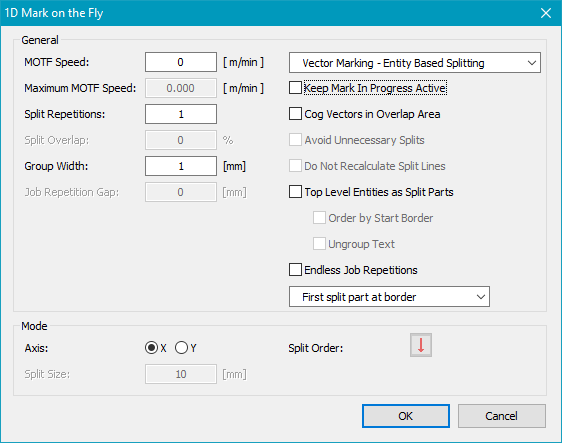
Figure 422: 1D Mark on the Fly Dialog
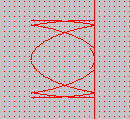
The figure below illustrates how a 1D MOTF split job changes once marking is triggered via Mark → Trigger.
|
|
|---|
Figure 423: 1D Mark On the Fly Split before and after activation of Mark → Trigger