|
<< Click to Display Table of Contents > Ring Splitting |
  
|
|
<< Click to Display Table of Contents > Ring Splitting |
|
Ring Splitting is a mode dedicated to engraving on ring-shaped objects and surfaces. This mode requires the connected motion controller to have at least one rotational (angular) axis configured.

Figure 424: Ring-shaped Object
|
If an option is grayed out in the Splitting Settings dialog, it cannot be used with the currently selected splitting option. Parameters that are checked but grayed out are not used. This mode is not optimized for splitting bitmaps. Therefore, some settings, such as Split Overlap or Cog Vectors in Overlap Area, have no effect, as they target vectors. These settings will not be grayed out for bitmaps. |
|---|
The following table lists all available parameters for Ring Splitting and their availability per marking mode:
Ring Splitting Parameters |
Vector Marking |
|||
|---|---|---|---|---|
✔ |
✔ |
✔ |
✔ |
|
✔ |
✔ |
✔ |
— |
|
✔ |
✔ |
✔ |
✔ |
|
✔ |
— |
— |
— |
|
Group Width [a] |
— |
✔ |
— |
— |
✔ |
✔ |
✔ |
✔ |
|
✔ |
✔ |
✔ |
✔ |
|
✔ |
✔ |
✔ |
✔ |
|
✔ |
✔ |
✔ |
✔ |
|
✔ |
✔ |
✔ |
— |
|
✔ |
— |
— |
— |
|
✔ |
— |
— |
— |
|
✔ |
✔ |
✔ |
✔ |
|
— |
✔ |
— |
— |
|
— |
✔ |
— |
— |
|
Ungroup Text [b] |
— |
✔ |
— |
— |
✔ |
✔ |
✔ |
✔ |
|
✔ |
✔ |
✔ |
— |
|
✔ |
✔ |
— |
✔ |
|
✔ |
✔ |
✔ |
✔ |
|
✔ |
✔ |
✔ |
✔ |
|
✔ |
— |
— |
✔ |
|
✔ |
✔ |
— |
✔ |
|
✔ |
✔ |
✔ |
✔ |
|
— |
— |
— |
✔ |
|
✔ |
✔ |
— |
✔ |
|
✔ |
✔ |
✔ |
✔ |
|
Table 55: Ring Splitting Parameters
[a]: Not available when Top Level Entities as Split Parts is checked.
[b]: Cannot be used together with Group Width.
Configuration of these parameters is done in the Ring Splitting dialog shown below.
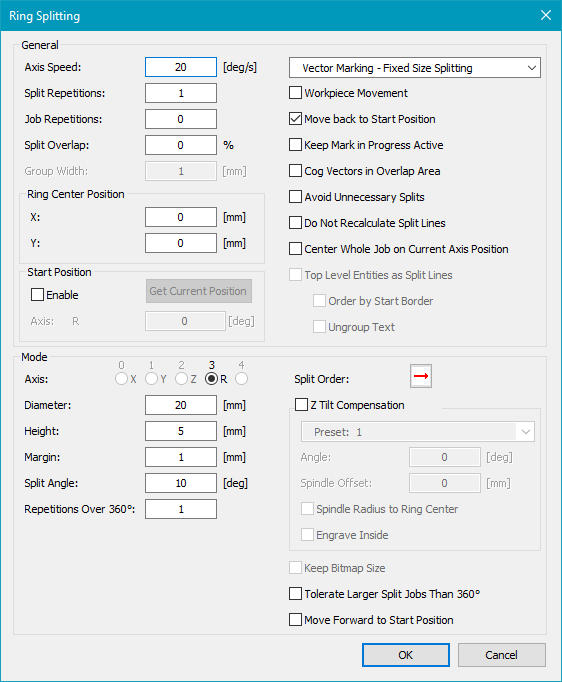
Figure 425: Ring Splitting Dialog
The figure below illustrates how a Ring split job changes once marking is triggered via Mark → Trigger.
|
|
|---|
Figure 426: Ring Split before and after activation of Mark → Trigger


