|
<< Click to Display Table of Contents > Ramping Settings |
  
|
|
<< Click to Display Table of Contents > Ramping Settings |
|
The following dialog can be reached at Mark → Edit → Ramping. Ramping allows to smoothly increase or decrease the speed or the power of the pen at the beginning or the end of the marking. It is also possible to add marking vectors at the beginning or the end of a marking in order to slowly increase the amount of energy delivered to the sample object.
|
If laser mode is IPG and the laser type 0 the power is changed by a manual latch sequence. This takes about 4 ms for each step. For power ramping the number of steps is therefore significantly reduced when using high marking speeds. |
|---|
|
Dynamic and regular Ramping is not compatible with the MultiHead functionality. |
|---|
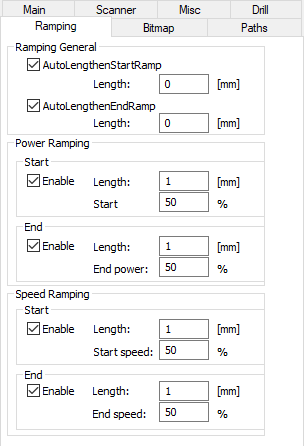
Figure 136: Ramping Settings Dialog |
Ramping General: This function has to be used in combination with Power Ramping or Speed Ramping. Add Start Vector: Add marking vectors before the beginning of the actual marking. Add End Vector: Add marking vectors behind the end of the actual marking. Dynamic Ramping: Either dynamic or regular ramping can be chosen. Power/Speed: Define a dynamic ramping map. Further details can be found here. Line Splitting Length: This parameter specifies the distance along a line after which a new point is generated and the power or speed will change during the ramping. Regular Ramping: Either dynamic or regular ramping can be chosen. Power Ramping: This function can be used without any other Ramping or together with Ramping General/Speed Ramping. Start: Enable power ramping at the beginning of the marking. This smoothly increases the power of the laser from a given start value Start power to 100 % within the Length in mm. The checkbox Activate must be checked to enable this functionality. End: Enable power ramping at the end of the marking. This smoothly decreases the power of the laser from 100 % to a given End power within the Length in mm. The checkbox Activate must be checked to enable this functionality. Speed Ramping: This function can be used without any other Ramping or together with Ramping General/Power Ramping. Speed changes with increasing marking length. Start: Enable speed ramping at the beginning of the marking. This smoothly increases the speed of the scanner from a given start value Start speed to 100 % within the Length in mm. The checkbox Activate must be checked to enable this functionality. End: Enable speed ramping at the end of the marking. This smoothly decreases the speed of the scanner from 100 % to a given End speed within the Length in mm. The checkbox Activate must be checked to enable this functionality. |
|---|