|
<< Click to Display Table of Contents > Laser |
  
|
|
<< Click to Display Table of Contents > Laser |
|
The following dialog can be reached by using menu item Settings → System → Laser, here the laser and the shutter control can be configured.
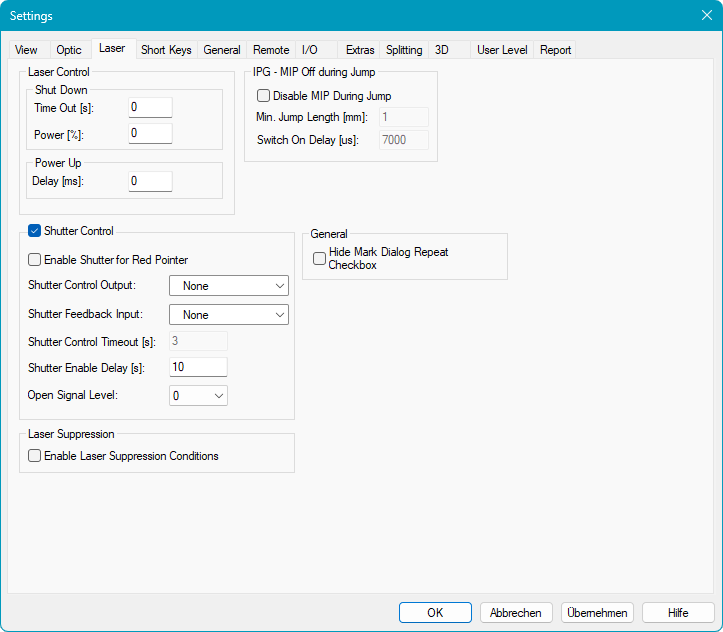
Figure 52: Laser Settings Dialog
Laser Control:
Shut Down (Power Save Mode):
Time Out [s]: Defines how long the laser can remain inactive before it automatically enters Power Save Mode. Setting the value to 0 disables the Power Save Mode feature.
Power [%]: Defines the Power the laser gets in Power Save Mode. If Power is set to 0 the laser will shut down.
Power Up:
Delay [ms]: Defines a delay for power up procedure when laser exits Power Save Mode. During the power up procedure, the laser power ramps from the power save level to full power. The Laser Gate and Marking in Process (MIP) signals are inactive during the power up procedure. After the power up is completed the laser returns back to normal operating mode and the marking process will begin.
IPG - MIP off during Jump: This field is available only for USC cards and when IPG is selected in Settings → System → Optic → Advanced → Mode.
Disable MIP during jump: If the checkbox is enabled, the MIP (Opto_Out_0) will be switched off during jumps.
Jump Length [mm]: Jumps that are longer than this value will lead to a switch off.
Delay [µs]: After a Jump, this delay is executed before the scanner continues with the next vector.
Shutter Control: The Shutter Control manages opening and closing of the laser shutter during operation. It ensures that the shutter is opened only when marking is active and closed automatically when the laser is inactive or an error occurs.
General:
Hide Mark Dialog Repeat Checkbox: Enables or disables the visibility of the Repeat Mark checkbox in the Mark Dialog.
Laser Suppression (not USC-1): Suppresses the LaserGate signal if conditions are met.
Laser Suppression Condition: Activates the option to define conditions for laser suppression for individual entities.