|
<< Click to Display Table of Contents > FTP Server |
  
|
|
<< Click to Display Table of Contents > FTP Server |
|
USC-2 cards can be accessed via an FTP server to transfer data such as job and correction files.
The connection with the FTP server can be established using the IP address of the card. The card must be connected via Ethernet.
The upper limit of files that can be uploaded into each folder is 1024. If this limit is exceeded, the card will crash. In such cases, please press Flash -> InitFlash.
Even if 1024 job files can be saved on to the card, only 255 job files can be displayed in the job list of the Flash dialog.
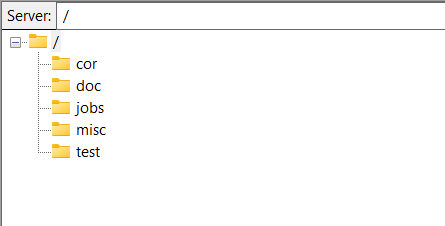
Figure 12: Example of the card content, accessed by the FTP server through FileZilla
cor: Contains the correction files (*.ucf) of the scan heads and additional files:
sc_usc2_corr_def.txt: Contains the mapping of which file is assigned to which scan head.
sc_usc2_working_shift_def.bin: Contains the information of the feature shift map.
step_size_table: Pre-calculated table for vector decomposition
sin_cos_table: Pre-calculated table of sin and cos.
doc:
jobs: Contains the job and the *.unf files. saved in flash and the file "sc_job_list.bin" contains the job list assignment.
misc:
sc_g_code_setup.bin: Stepper settings on the board. These are overwritten by the store button in the SAMLight optic advanced dialog or in sc_setup.
sc_gcode_defines.cnc.: This file contains the default G-code definitions (conversion from CNC to UNF on the board). This file it not present by default, but can be copied to this folder.
test: The log file of the main CPU.