|
<< Click to Display Table of Contents > Ethernet |
  
|
|
<< Click to Display Table of Contents > Ethernet |
|
The USC-2 provides a 10/100 Mb/s Ethernet (10BASE-T/100BASE-TX) interface. The connector is a standard RJ-45 connector.
|
The Ethernet connection is meant as an alternative to the USB connection. For security reasons, the USC-card should only be used as a direct connection within a secured subnet - NOT as part of an open network.
|
|---|
Ethernet of the USC-2 card can be used for the following purposes:
Port |
Function |
|---|---|
21 |
FTP. FlashMode FTP must be enabled. |
23 |
Telnet FCI commands for control in flash (standalone) mode. FlashMode TELNET must be enabled. |
8112 |
Binary connection to USC server connection (used by SAMLight) |
Table 18: Ethernet ports of USC-2 cards.
Type |
Default value |
|---|---|
IP address |
192.168.1.2 |
Subnet mask |
255.255.255.0 |
Gateway |
192.168.1.50 |
Table 19: Ethernet default values of USC-2 cards.
If jumper JP2 is open, all Ethernet settings of the USC card are set to default. The jumper configuration is read when the card is booting.
Make sure that the network adapter settings of the PC are configured correctly such that the IP address of the USC card can be reached. Test this with "ping <USC_IP>". Please, also refer to SAMLight manual > sc_usc_server.exe > LAN.
Transfer rates |
approximately |
|---|---|
Ethernet |
4 MByte/s |
Table 20: Transfer rates
How to connect the USC-2 via LAN with/without an USB connection:
To change the Ethernet parameters of the USC-2, the card must be recognized in the USC server. This can be done either via USB or Ethernet with the current Ethernet parameters. When using Ethernet, the IP address of the USC card must be set at one of the connect strings in <SCAPS>/system/sc_usc.cfg. Before editing the sc_usc.cfg the USC server must be closed, which you should check with the Windows Task Manager.
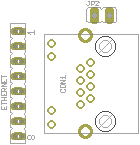
Figure 11: Ethernet connector and jumper
