|
<< Click to Display Table of Contents > Red pointer |
  
|
|
<< Click to Display Table of Contents > Red pointer |
|
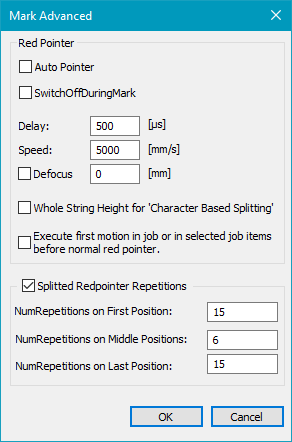
Figure 395: Mark Advanced Dialog |
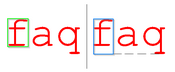
Auto Pointer: If enabled, the red pointer starts automatically after each marking showing the red pointer shape of the next marking sequence. SwitchOffDuringMark: If enabled, the red pointer is switched off during mark. Delay: Value determines delay of the red pointer. This value will overwrite the delay values (jump, mark and poly delay) in pen 255 (red pointer pen). Speed: Value determines speed of the red pointer. This value will overwrite the speed values (mark and jump speed) in pen 255 (red pointer pen). The speed limits are imported from the jump speed limits in min/max Dialog. Defocus: This activates a focus shift on the Z-Axis. Whole String Height for 'Character Based Splitting' : If enabled, the height of the whole string is taken for outlining with the Red Pointer. See example in Fig.396:
Figure 396: Green for flag disabled, blue for flag activated. Execute first motion in job or in selected job items before normal red pointer: If enabled, the first ScMotionControl entity of the job will be executed when the Red Pointer start button is pressed. Split Redpointer Repetitions: Settings are necessary for the correct Red pointer functionality in the splitting mode. If unchecked (default), the red pointer runs endless on first split part. If the entity is not a split entity, this option is deactivated NumRepetitions on First Position: How often the Red Pointer runs the first split part. NumRepetitions on Middle Positions: How often the Red Pointer runs the all the split parts that are in between the first and the last split part. NumRepetitions on Last Position: How often the Red Pointer runs the last split part. |
|---|