|
<< Click to Display Table of Contents > Defocus |
  
|
|
<< Click to Display Table of Contents > Defocus |
|
The Defocus activates a focus shift on the z-axis. It is only available for USC-cards with an activated Flatlense license. How the z-shift is calculated due to the pen defocus depends on the used setup:
Card-Type |
With Optic3D |
Without Optic3D |
|---|---|---|
USC-1 |
According to the Z-Lookup-Table [mm] |
Defocus not available |
USC-2 |
According to the Z-Lookup-Table [mm] |
[216 bit / Z Field Size][a] |
USC-3 / USC-4 |
According to the Z-Lookup-Table [mm] or [216 bit / Z Field Size][a]/[b] |
[216 bit / Z Field Size][a] |
RTC-cards[c] |
[216 bit / Field Size] |
[216 bit / Field Size] |
Table 18: Defocus behaviour dependent on activated licenses
[a]: If the feature Z-Dimension is not used, the Z field size is the same as the X/Y field size.
[b]: Which option is used, can be decided in the 3D Extended dialog.
[c]: For RTC cards, Defocus requires SCANLAB 3D option.
|
The defocus is saved in the unit bit. This means that the displayed value in mm will change if the Field Size is modified. If the calculation via [216 bit / Field Size] is used, the z-bit value will increase for positive defocus values. If the defocus works according to the Z-Lookup-Table, the focus distance will be increased for positive defocus values which is equivalent to a larger distance between scan head and focus point, and to a negative distance in the SAMLight reference. The z-bit value will then change according to the Lookup table. |
|---|
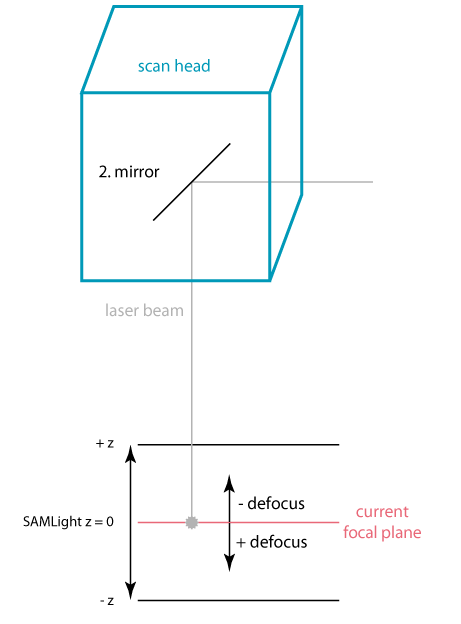
Figure 127: z-shift of defocus depending on defocus sign
