|
<< Click to Display Table of Contents > Perforation Dialog |
  
|
|
<< Click to Display Table of Contents > Perforation Dialog |
|
Perforation: if enabled vectors can be marked as dashed lines. At "Edit Segments" dialog four different On/Off segment lengths can be set, which defines the dashed line. A value must be entered in the "Length" field, it cannot be left blank. If only two different segment lengths are required, either enter the same value in the second "On" and "Off" fields, or enter "0" in both of the second "On" and "Off" fields. The marking result can be displayed in advance by the Preview Window in combination with Mark Preview. The Perforation feature does not work together with Mark Lines as Dots.
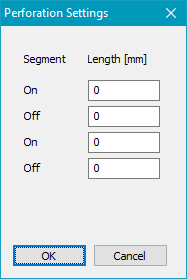
Figure 129: Perforation Dialog