|
<< Click to Display Table of Contents > Job Save/Load Dialog |
  
|
|
<< Click to Display Table of Contents > Job Save/Load Dialog |
|
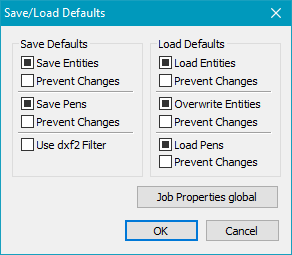
This dialog is accessed via Settings → System → General → Job Save/Load Dialog and can be used to set the default state of entities and pens of a job during saving and loading. The checkboxes manipulated by this dialog, are located in the Open and Save as Dialog.
Figure 60: Save/Load Defaults Dialog |
Settings Selection: There are three different choosable default states:
Prevent Changes: Prevents the user from modifying the set default settings when saving and loading jobs. Save Defaults: Define the default state of the settings used when saving jobs Save Entities: Set the default settings regarding the saving of entities in jobs Save Pens: Set the default settings regarding the saving of pens in jobs Load Defaults: Define the default state of the settings used when loading jobs Load Entities: Set the default settings regarding the loading of entities Overwrite Entities: Set the default settings regarding the handling of entities already present in SAMLight when loading jobs Load Pens: Set the default settings regarding the loading of pens Job Properties Global: Equal to Job Properties, but used for all jobs. |