|
<< Click to Display Table of Contents > Job processing |
  
|
|
<< Click to Display Table of Contents > Job processing |
|
In general the job preparation will start with the editor which allows to setup fixed and variable geometries together with marking parameters and process flow elements. Also more general operation modes like the laser source, scanner field settings including correction file assignments and other modes like marking on the fly will be defined there.
The prepared job can be saved in SJF format for later reload or it can be converted to UNF format which can be executed by the flash. Uploading and executing of SJF files itself is not possible. By default the editor will attach the SJF file to the UNF file. This allows a reverse processing of a generated UNF file to its original SJF file which can be re imported into the editor.
The general dialog to achieve this functions will be started by Menu bar → Extras → Flash.
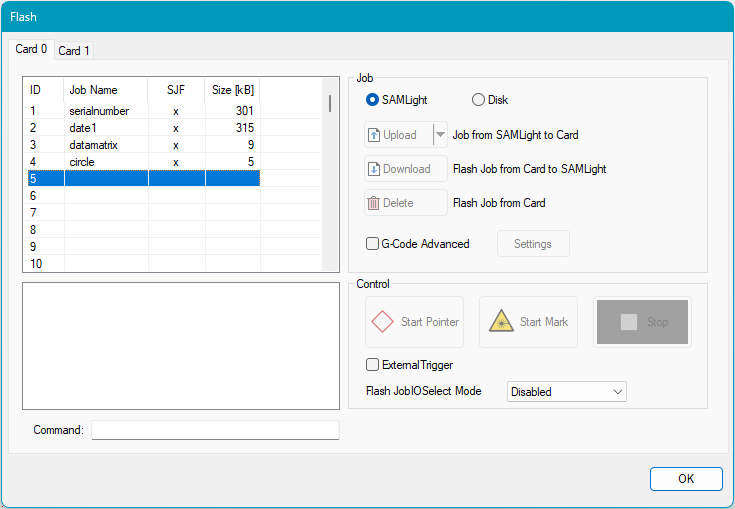
Figure 472: Flash Main Dialog
Job List:
ID: Number of uploaded job.
Job Name: Name of uploaded job file.
SJF: "SAMLight Job File" checks if the loaded file is in a *sjf format.
Size [kB]: Size of uploaded job file.
Job:
Disk: Load a job from a disk.
Upload: Upload a Job from SAMLight to the card.
Download: Download a Flash job from the card to SAMLight.
Delete: Delete a Flash job from the card.
G-Code Advanced: If checked the "Settings button" opens the Endless MOTF Dialog.
Control:
Start Pointer: Starts the red pointer. This button is active only if the red pointer is enabled. For the red pointer pen #255 is used (see chapter Mark Settings). While the red pointer is outlining, scaling and nudging can be done with the hotkeys listed below.
Start Mark: Starts the mark process.
Stop: Stops the mark process.
External Trigger: If checked the mark process can be started by an external trigger signal. If MOTF is enabled, this checkbox is not available (due to software jitter). Please use Mark - Trigger instead.
Flash JobIOSelect Mode: The Flash JobIOSelect mode is used to manage the job selection and start the marking event via the OptoIn bits of the USC-2 or USC-3 card. OptoIn_2..5 (up to 15 jobs) or DigiIn_0..7 (up to 255 jobs) can be used as binary job selection input pins. See chapter Flash IO Job Selection.
|
The Offset, Gain and Rotation parameters of this dialog could be interesting if you have several Jobs on the Flash of the USC-2/-3 card and want to change these parameters for all these jobs. Since the calculation is done on the card, the parameters would be applied to all jobs already existing on the Flash. |
|---|
