|
<< Click to Display Table of Contents > Flash |
  
|
|
<< Click to Display Table of Contents > Flash |
|
With the Flash option the USC-2,USC-3 and USC-4 cards can be used as stand alone units.
A PC is only required for job setup.
When clicking on Flash... in the sc_usc_server, the following dialog opens:
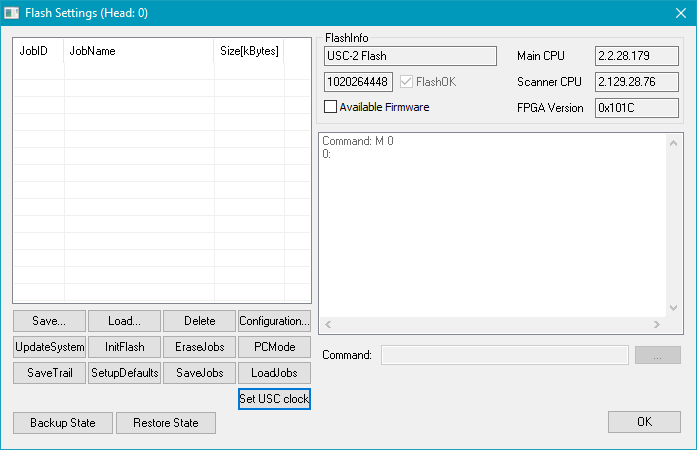
Figure 4: Flash settings
Available buttons are explained in the following:
Save: Opens the dialog to save the selected job from the job list with a desired name at a desired location.
Load: Opens the dialog to load a job into the job list. The new job will be added to the list at the first free slot.
Delete: Deletes the selected job from the flash memory.
Configuration...: Opens the Flash Configuration dialog ( see figure 5 and table 2).
UpdateSystem: Initiates an update of the firmware of the USC card. This is recommended in case of the message "New firmware available" or "Firmware newer than available".
InitFlash: Initializes the complete flash memory. All jobs currently stored on the card will be deleted and default settings will be restored. This includes inversions of output signals. To prevent Laser accidents, please make sure to unpower your laser or disconnect it from the USC-card before pressing this button. Please restart your USC-Card afterwards. Then reselect your old correction file and store the new settings.
EraseJobs: Deletes all jobs from the flash memory.
PCMode: Activates the communication to the USC card via FCI commands (in the "Command" line).
SaveTrail: Saves trail files in <SCAPS>\intermed if the trailing has been activated ( USC-2 , USC-3, USC-4 ).
SetupDefaults: Clears all customized settings on the card and restores default settings.
SaveJobs: Saves all jobs currently in the job list in a new folder created in <SCAPS>\jobfiles.
LoadJobs: Loads all previously saved jobs onto the card. Those jobs should follow the convention: jobnumber_jobname.unf, for example 2_infinitecircle.unf.
Set USC clock: Synchronizes the timer on the USC card with the time of the PC.
The button Configuration... opens the following dialog:
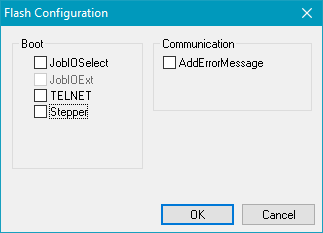
Figure 5: Flash Configuration
Checkbox |
Description |
|---|---|
After booting, the device goes into the Job IO Selection mode. |
|
JobIOExt |
In combination with Job IO Selection mode, this mode enables the inputs [0..7] of the Extension connector, so that 255 Jobs can be selected. (not available for USC-1) |
TELNET |
Activates the TELNET remote control for a USC-2, USC-3 or a USC-4 card. After the activation the card can be accessed via the TELNET (RJ45) port #23. (not available for USC-1) |
AddErrorMessage |
Shows Error Message also in readable text in RS-232 and PCMode (not just the error code). |
Table 2: Flash Configuration
|
JobIOExt and TELNET are only available with USC-2, USC-3 and USC-4. |
|---|
