|
<< Click to Display Table of Contents > FCI Debug Log |
  
|
|
<< Click to Display Table of Contents > FCI Debug Log |
|
It is possible to log every sent FCI command. This chapter explains how the debug log file can be enabled. Start by selecting Flash... on the usc server to open den Flash Settings dialog.
USC-2:
For the USC-2 there is no direct command to activate the FCI debug log. To generate it, the FCI command JSF 0x10000 needs to be send and saved via the svg command. This activates the trailing of flash commands after the USC-2 card has been rebooted. All commands sent after the reboot will be registered in the debug log file. By clicking on Save Trail, the FCI debug log called sc_usc2_cmd_trail_head_n_yyyy_zzzz.txt is created in <SCAPS>\intermed\sc_flash_trail.zip.
|
The file sc_usc2_cmd_trail_head_n_yyyy_zzzz.txt can be read using ANSI encoding. |
|---|
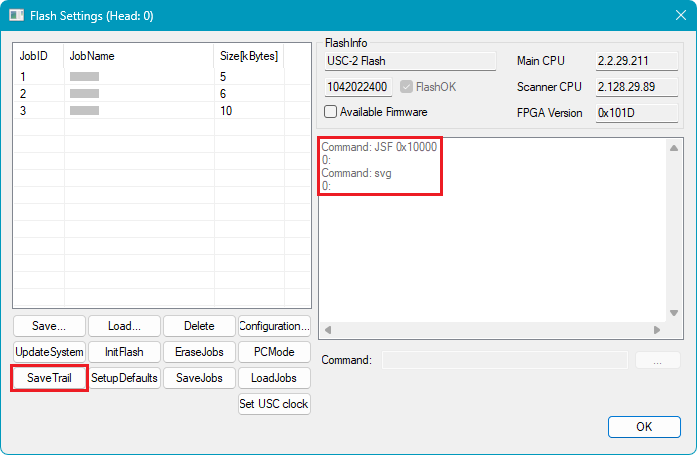
Figure 6: FCI Debug Log for USC-2
USC-3 / USC-4:
To create the FCI debug log of the USC-3 / USC-4 card, send the FCI command FCILOG 1 and save it via svg. When this mode is active, the log is written by clicking on the button Save Trail. The log file is located in <SCAPS>\intermed\sc_flash_trail.zip.
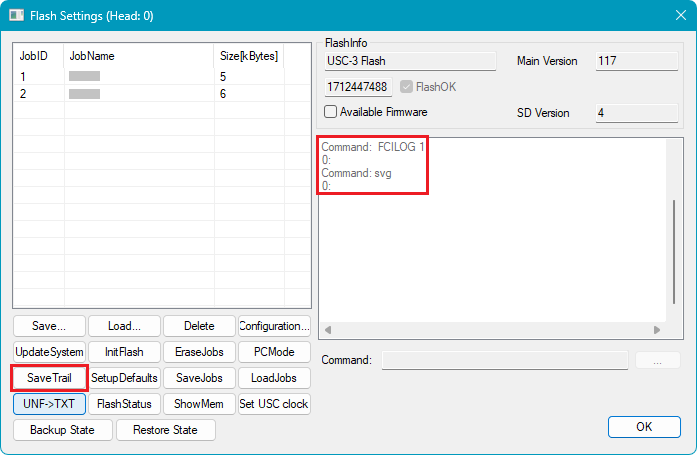
Figure 7: FCI Debug Log for USC-3 / -4
